
Introduction: Why Large PDF Intelligence Is Hard
Table of Contents
- Introduction: Why Large PDF Intelligence Is Hard
- The End-to-End AI Document Pipeline for Large PDFs
- Layout-aware OCR, Classification, and Structure-first Preprocessing
- Key-value and Table Extraction with Span-level Accuracy
- Vision-language Models for Scanned and Complex PDFs
- Practical Tips and Next Steps for Large-PDF Pipelines
If you work with contracts, financial statements, or long regulatory filings in Australia, you already know the pain of large PDFs. AI document intelligence services promise to turn those files into structured data, but doing that accurately at scale is much harder than it looks.
The challenge is not just reading text. It is understanding layouts, columns, tables, footnotes, images, and then extracting the right values and making them trustworthy enough for business decisions. This part of our series focuses on the end-to-end technical architecture that makes large-document AI work in practice – from ingestion and layout-aware OCR through to extraction accuracy and review efficiency, drawing on patterns described in recent AI document analysis guides.
We will walk through the main pipeline stages, show how modern vision and language models improve reliability, and highlight how Australian organisations can move beyond simple PDF-to-text into robust, production-ready document intelligence, using approaches similar to those in modern document analysis platforms.
The End-to-End AI Document Pipeline for Large PDFs
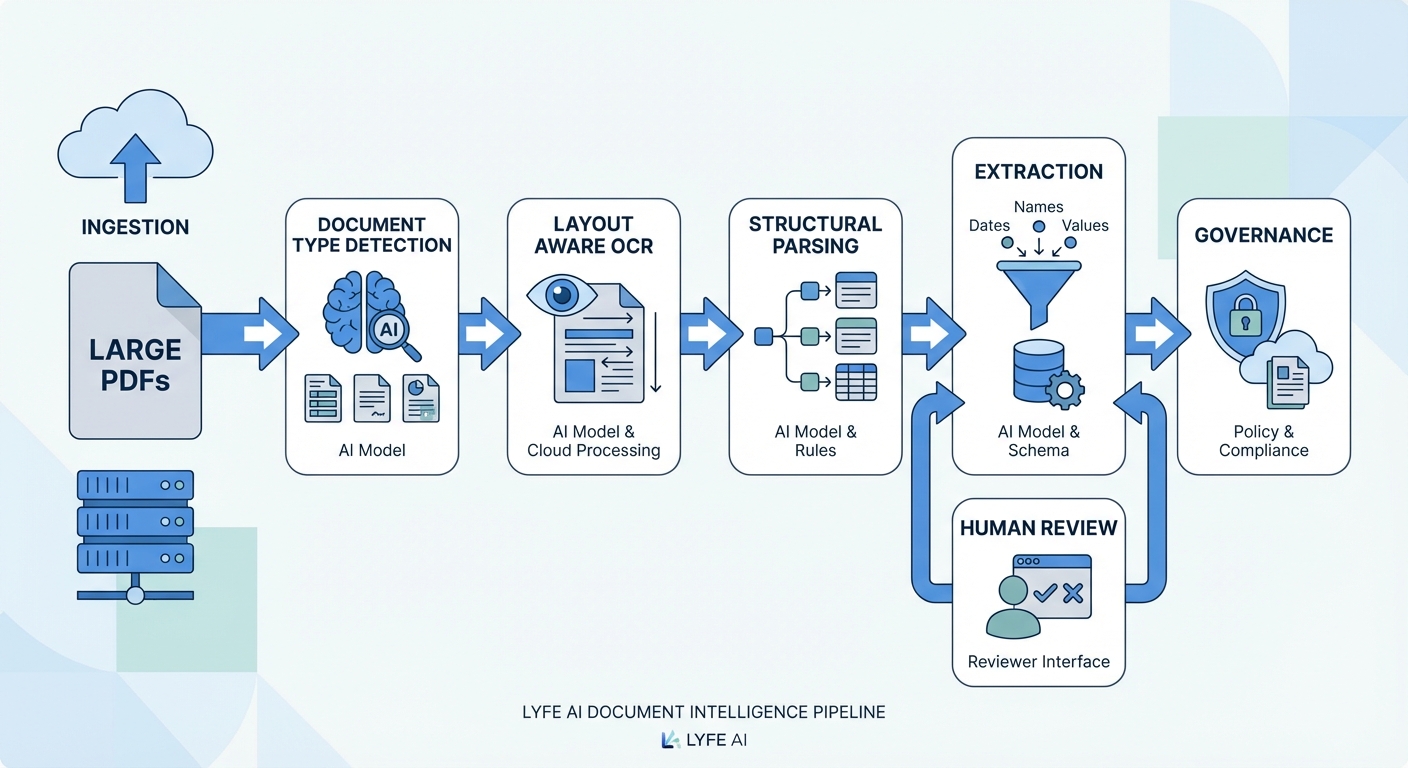
A reliable AI document intelligence system for large PDFs is best thought of as a pipeline, not a single model. The first question it must answer is basic but vital: what kind of document is this? At ingestion, the system should detect whether a file is born-digital, fully scanned, or a hybrid with both text and images. It also needs to recognise whether the pages are single column, multi-column, dense with tables, heavy on images, or full of forms and stamps. That early diagnosis shapes every downstream decision, from which optical character recognition (OCR) settings to use to which extraction models to load, much like the staged architectures described in document-processing reference workflows.
After type detection, a preprocessing stage cleans and normalises the input. Scanned or partially scanned PDFs are sent through OCR so that images become searchable text. Commercial platforms often report character error rates below 1% and word error rates below 2% on high-quality, 300 DPI scans of clean printed text, but accuracy can still drop quickly when pages are skewed, low-resolution, or visually cluttered. At scale, cloud-based intelligent document processing platforms often combine OCR with computer vision APIs as the first leg of the journey, essentially building a layer of machine-readable structure before any natural language processing is attempted; this mirrors how leading AI document analyzers orchestrate their pipelines.
Once text and basic layout are available, the pipeline moves into structural understanding and semantic analysis. Layout parsers work out reading order, columns, section boundaries, and table regions. Then machine learning and natural language models classify the document, identify entities such as parties and dates, and extract key fields and tables. The final stages focus on quality: attaching extracted values to their page locations, assessing accuracy scores, and flagging low-confidence items for human review. When all of these parts are tuned and stitched together, the result is a repeatable flow that converts messy, long PDFs into structured data ready for downstream systems, whether they are internal line-of-business apps or managed AI services for Australian teams.
Source: https://aws.amazon.com/textract/
Layout-aware OCR, Classification, and Structure-first Preprocessing
Traditional OCR tools tend to flatten a page into a simple text dump. For a 200-page annual report or a tight multipage contract, that is usually disastrous. However, some experts argue that “flattening” isn’t always a failure mode, and that traditional OCR still delivers exactly what many workflows need. If you’re bulk-indexing millions of pages for search, feeding normalized text into an LLM, or running simple keyword-based compliance checks, a clean text dump can actually be a feature, not a bug. Many mature OCR engines also include basic layout cues—such as paragraph breaks, simple tables, and font attributes—that are good enough for a large class of documents. In other words, layout-aware OCR is a major upgrade for structurally complex content like financial reports and contracts, but it’s not a universal requirement; for high-volume, text-centric pipelines, classic OCR remains a fast, cost-effective, and perfectly viable option. Columns are merged, table headers get scattered, and footnotes are orphaned from the passages they explain. Layout-aware OCR aims to cure this by treating each page as a set of zones with an explicit reading order instead of just a grid of characters. It tracks blocks, lines, and regions, and associates each piece of text with its visual context on the page, following best practices seen in modern document AI workflows.
This structure-first approach matters when dealing with rotated pages, mixed fonts, marginal notes, and stamps. In a typical Australian financial report, rows of numbers are rarely useful without the column headers and footers that define them. Layout-aware OCR preserves the geometry of tables, keeps footnotes linked to the main text, and respects multi-column layouts in news-style or regulatory documents. Performance is usually judged with character error rate and word error rate at both page and block level, but the real measure is whether the output supports reliable downstream extraction, including when paired with custom AI models tuned for local document formats.
Pairing OCR with vision-language cues makes a big difference on complex layouts. Vision components help locate tables, logos, and headings; language models help decide which regions are titles, body text, or disclaimers. Together, they can resolve ambiguous reading order in sidebars and stacked content, which is common in policy documents and product disclosure statements. For Australian teams, this early investment in layout-aware OCR pays off later in reduced post-processing, fewer extraction errors, and smaller review queues, especially when dealing with legacy scanned archives that will ultimately feed into professional AI automation workflows.
Once a PDF has been converted into structured text and layout blocks, the next major step is deciding what kind of document it is and where it should go. An end-to-end pipeline that treats every file the same will either miss important fields or hallucinate structure that is not there. A classification layer solves this by assigning each document to a type, such as invoice, employment contract, credit agreement, or annual report. In many Australian organisations, there might be dozens of such types, each with its own rules and downstream processes, which is why mature solutions often rely on document review tooling to close the feedback loop.
Effective classification relies on features drawn from both text and layout. Title phrases, recurring headers, logos, and signature patterns can all contribute to a model’s view. Once a type is predicted, the pipeline can route the document to a tailored workflow and a specific extractor tuned for that template family. This is what prevents an invoice extractor from being blindly applied to a trust deed or compliance policy. It cuts down false positives and simplifies how rule-based checks are added on top of AI models, especially when orchestration is handled by a secure Australian AI assistant rather than scattered scripts.
Quality monitoring is essential at this stage. Metrics such as precision, recall, and macro-averaged F1 score give a clear picture of how well the classifier distinguishes between look-alike document categories. In production, low-confidence classifications should be diverted for manual triage rather than forced through the wrong workflow. This selective routing both protects the accuracy of the captured data and provides valuable feedback to improve models. Over time, as more labelled Australian examples are logged, the classification layer becomes more robust, allowing automation rates to increase without taking on extra risk, a pattern echoed in playbooks for accurate AI document processing.
Source: https://www.v7labs.com/blog/document-ai, https://arxiv.org/abs/2301.08917
Key-value and Table Extraction with Span-level Accuracy
After a document has been classified and routed to the right workflow, the pipeline can finally focus on extracting concrete values. Two patterns dominate here: key-value pairs and tables. Key-value extraction uses named entity models and pattern recognition to pull fields such as invoice numbers, ABNs, GST amounts, due dates, or clause numbers. In many Australian businesses, those values feed straight into ERP, billing, or claims systems, so small mistakes can have outsized impacts on cash flow and compliance, which is why many teams pair extraction engines with AI drives for legal and professional workflows.
Table extraction is more demanding. A table is not just a grid of text; it is a set of relationships between rows, columns, and headers. Advanced extractors need to detect merged cells, subtotals, section headers, and nested tables inside notes. For instance, a superannuation fund statement may contain several multi-page tables with rolling balances and contribution types spread across rows. Accurately representing these structures digitally requires both vision cues from the layout and language cues from header labels and repeating patterns, often implemented as part of custom document models designed for a given sector.
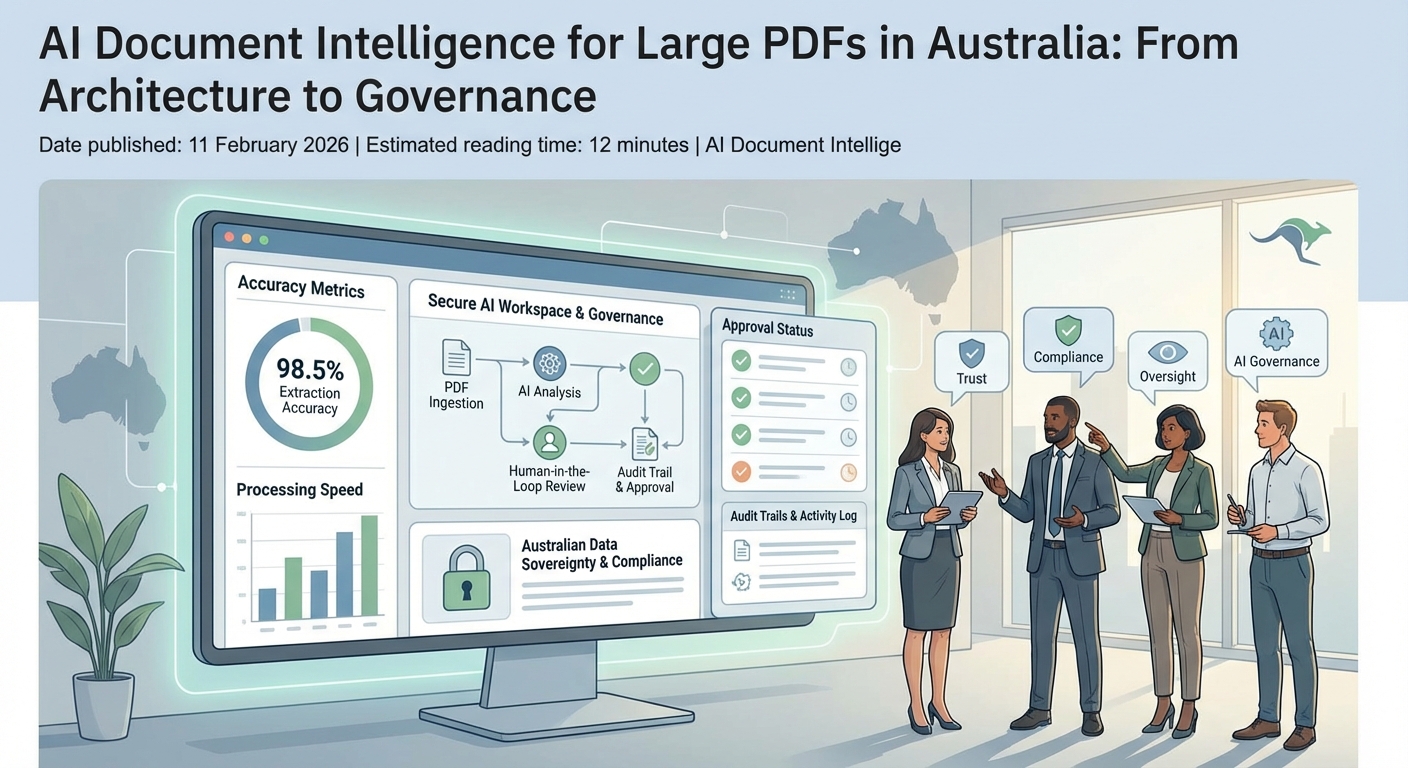
A critical design choice is how each extracted value is tied back to its origin in the document. Rather than storing only a string such as “12,500.00”, modern systems also record which page it came from, which bounding box on that page, and which text span within the OCR output. Reviewers can then click on a field in the interface and immediately see the original context, complete with surrounding rows and headings. This span-level connection dramatically speeds up verification because users do not have to hunt through 150 pages to confirm a single figure. It also improves trust, since any future dispute can be resolved by jumping straight to the source view that the AI used when making its prediction, a pattern increasingly baked into AI-assisted document review interfaces.
Source: https://dl.acm.org/doi/10.1145/3534678.3539101
Vision-language Models for Scanned and Complex PDFs
Many Australian organisations still hold critical information in scanned archives. These might be decades of loan files, legacy contracts, or old engineering drawings saved as image-only PDFs. Simple OCR can make the text searchable, but it often struggles with skewed pages, stamps, handwritten notes, and unusual fonts. This is where combining layout-aware OCR with vision-language models becomes a turning point for reliability and coverage, especially when orchestrated within an end-to-end AI solution designed for Australian data residency and governance.
Vision-language models are trained on both images and text together, which allows them to understand how words sit within a visual layout. However, some experts argue that calling this combination a definitive “turning point” may be premature. Layout-aware OCR and vision-language models still face real-world constraints: highly degraded scans, niche industry shorthand, and messy handwritten annotations can all produce inconsistent results without careful tuning and human oversight. End-to-end AI platforms that meet Australian data residency and governance requirements can also introduce complexity in integration, upfront cost, and change management, which may limit immediate adoption for smaller organisations or those with legacy systems. From this perspective, these technologies are a major step forward rather than a silver bullet, and their true impact will depend on how thoughtfully they’re implemented, monitored, and combined with existing human and process controls. In practice, they can recognise that a bold, centred line near the top of a page is likely a heading, or that a block of small print at the bottom is probably a disclaimer. When applied to scanned PDFs, these models help separate decorative elements from content, distinguish tables from running text, and identify important artefacts such as signatures or seals. They effectively provide a higher-level understanding that pure OCR cannot match, and are now being paired with specialised model-selection strategies so that the right engine is used for each document.
Before rolling out automation on a large set of scanned and complex PDFs, it pays to run a careful assessment. Teams should sample documents to understand how much format variance exists, what kinds of errors occur in OCR and layout detection, and how expensive those errors are to fix. This upstream assessment shapes decisions about model selection, confidence scoring, and when to design special-case workflows for outlier formats. When done thoughtfully, the combination of layout-aware OCR and vision-language models lets organisations bring hard-to-parse archives into the same end-to-end AI pipeline without sacrificing accuracy or review efficiency, particularly when paired with routing approaches similar to those in model selection and routing guides.
Source: https://arxiv.org/abs/2103.06561
Practical Tips and Next Steps for Large-PDF Pipelines
Turning these concepts into a working pipeline starts with scoping. Begin by listing the document types that matter most for your Australian business and ranking them by volume and risk. High-volume, lower-risk items such as supplier invoices are often good first candidates, while complex, low-volume contracts may be better tackled after the core architecture is proven. For each type, define the key fields and tables that need to be captured and which downstream systems they feed, and note where specialist implementation services might accelerate delivery.
On the technical side, invest early in a robust ingestion and preprocessing layer. That means document type detection, layout-aware OCR, and basic quality checks before any extraction is attempted. Build a clear separation between classification, extraction, and review components so you can swap models or tuning strategies without rebuilding the whole stack. Where possible, design interfaces that let reviewers see extracted values and their original context side by side, because that is where the time savings really show up, particularly when combined with the kind of document-centric workspaces emerging in legaltech. Treat your pipeline as a living system rather than a one-off project: track error patterns, capture examples where the AI struggles, and use those samples to retrain or recalibrate models.
As new templates appear from partners, regulators, or courts, add them gradually and monitor performance before scaling up. With this mindset, you can roll out AI document intelligence for large PDFs in a controlled way that steadily raises automation while keeping accuracy within the bounds required for your sector, supported by ongoing managed AI optimisation. If you are planning or refining a document intelligence pipeline, map your stages, expose where the bottlenecks are, and decide which parts should be automated first, perhaps piloting on one high-impact document type and expanding from there using resources such as the Lyfe AI article index and analyses of emerging model capabilities.
Frequently Asked Questions
What is AI document intelligence for large PDFs and how is it used in Australia?
AI document intelligence for large PDFs uses OCR, layout analysis, and language models to turn long, complex PDFs—like contracts, financial statements, and regulatory filings—into structured, searchable data. In Australia, organisations use it to automate compliance checks, accelerate contract review, and integrate document data into core systems without manual rekeying.
How do you build an end-to-end AI document processing pipeline for large PDFs?
An effective pipeline typically includes ingestion and document type detection, layout-aware OCR, page and section segmentation, field and table extraction, and a human review and feedback loop. Each stage is orchestrated so that early decisions (for example, scanned vs born-digital, tables vs free text) determine which models and settings are applied downstream to maximise accuracy and speed.
What is layout-aware OCR and why does it matter for large PDF documents?
Layout-aware OCR goes beyond reading characters; it preserves structure like columns, tables, headers, footers, and footnotes. For large PDFs, this matters because misreading a table as plain text or merging multi-column content can break downstream extraction, leading to wrong figures, missing clauses, and unreliable analytics.
How can Australian organisations improve extraction accuracy from complex PDFs?
They can combine strong layout-aware OCR with domain-specific extraction models tuned to their document types, such as AFSL disclosures, loan contracts, or annual reports. Adding confidence scoring, rules-based validation (for example, ABN formats, date ranges), and human-in-the-loop review on high‑risk fields significantly lifts overall accuracy and trust.
What are the key architecture considerations for scaling AI document intelligence in an enterprise?
Key considerations include separating ingestion, processing, and review layers; using asynchronous, event-driven workflows; and designing for horizontal scaling of OCR and model services. Organisations should also log every processing step, capture model versions, and expose the pipeline via APIs so document intelligence can plug into existing DMS, CRM, and compliance tools.
How does LYFE AI help with AI document intelligence for large PDFs?
LYFE AI designs and implements end-to-end document intelligence pipelines tailored to Australian regulations, data residency requirements, and document types. Their services cover solution architecture, model selection and tuning, integration with existing systems, and setting up governance and review workflows so the AI can be trusted in production.
Is it better to use an off-the-shelf document analysis platform or a custom AI architecture?
Off-the-shelf platforms are good for quick wins and standard document types, but they can be hard to customise deeply for local regulations, niche formats, or specific workflows. A custom architecture, often built on top of these components, lets you mix best-in-class OCR, vision-language models, and business rules, while keeping control over data, performance, and governance—something LYFE AI helps clients design.
How do you handle very large or multi-hundred-page PDFs in an AI document pipeline?
Large PDFs are usually split into logical sections or page batches, processed in parallel, and then reassembled with consistent IDs and versioning. The pipeline must manage memory carefully, cache intermediate results, and prioritise pages or sections that contain high-value information so users can start reviewing outputs before the whole file is finished.
What governance and compliance issues should Australian organisations consider with AI document processing?
They need to ensure data residency (keeping sensitive documents in Australian regions where required), access control, and audit trails for every AI decision. Clear policies for human review, handling of personal and financial data under the Privacy Act and sector regulations, and documented model change management are critical for regulator and internal risk approval.
Can AI document intelligence integrate with my existing document management or workflow tools?
Yes, modern document intelligence architectures expose APIs and event hooks that allow integration with document management systems, CRM platforms, and workflow tools like ServiceNow or custom line-of-business apps. LYFE AI typically designs connectors or middleware so processed data and review tasks appear directly in the tools your teams already use.