
Table of Contents
- Introduction: Why Copilot for Outlook Email Matters in Australia
- What Copilot for Outlook Email Actually Does (and What It Doesn’t)
- Evaluating the Value of Copilot for AU Individuals, SMBs, and Enterprises
- Risk, Privacy, and Compliance for Copilot Email in the Australian Context
- Copilot vs Other Email AI Tools and Human Assistants
- Pragmatic Adoption Strategy and Internal Pilots for AU Organisations
- Practical Tips to Maximise Impact and Minimise Risk
- Conclusion & Next Steps
Introduction: Why Copilot for Outlook Email Matters in Australia

If your workday runs on Outlook, Microsoft Copilot for email is probably already on the agenda. Boards, executives, and IT leaders across Australia are asking the same question: is Copilot for Outlook email a smart move now, or a shiny distraction to park for later?
This article takes a strategic, Australian-focused look at Copilot for email in Outlook. We will unpack what the technology really does, where it adds the most value, and where its limits still bite. You will see how it stacks up against other AI email assistants and human support, and how to think about risk, privacy, and organisational rollout without drowning in hype.
Think of this as your executive‑level guide to deciding if Copilot for Outlook belongs in your email toolbox – and if so, how to approach it with clear eyes, not blind faith, including how it might sit alongside a more secure Australian AI assistant for everyday tasks in your broader digital stack.
What Copilot for Outlook Email Actually Does (and What It Doesn’t)
Microsoft Copilot in Outlook works as a lightweight AI assistant that sits on top of your existing email setup. It It’s available in the new Outlook for Windows, Outlook on the web, Outlook for Mac, and Outlook mobile, and focuses on a few high‑leverage tasks: summarising long threads, drafting emails, helping you prioritise inbox items, and supporting triage actions such as pinning or archiving as Microsoft’s own guidance highlights..
In practice, that means you can click the Copilot icon, ask “Summarise this thread” or “Draft a reply that confirms our meeting and asks for the updated proposal,” and get something usable in seconds. For new messages, you can select “Draft with Copilot”, give it a short brief, and it will generate a starting point that you can tune for tone, detail, and accuracy.
Technically, this is powerful. It draws on Microsoft Graph, so Copilot can see related emails, Teams chats, and calendar events inside your tenant, giving it richer context than a generic AI tool. It can Once you enable the “Prioritise my inbox” feature documented in Microsoft’s official FAQ, it can automatically assign high, normal, or low importance labels to new incoming messages using signals such as who sent the mail, their job title, and the content of the message, while excluding certain types of emails. FAQ.
Yet it is not a self‑driving inbox. Copilot will not autonomously send messages, build elaborate folder systems, or consistently apply deeply personal rules (such as “Treat any email from this community partner as top priority unless it is a newsletter”). It doesn’t retrain its core model on your individual usage, but it does offer features like Memory and Custom Instructions that let it learn and apply your preferences over time, within the boundaries you set; it won’t autonomously overhaul your workflow behind the scenes without you turning those options on or adjusting your settings. You still drive; it simply gives you a faster, smarter dashboard.
For Australian organisations, that distinction matters. Copilot is a force multiplier for humans, not a replacement for a trained EA or a carefully designed shared mailbox process. If you go in assuming it will “run email for you,” you will be disappointed; if you frame it as a speed layer on top of existing practices, you can extract real, measurable advantage – especially when paired with tailored AI services built around your specific workflows.
Evaluating the Value of Copilot for AU Individuals, SMBs, and Enterprises
To judge whether Copilot for Outlook is worth the spend in Australia, you first need to understand who benefits the most. Microsoft 365 Copilot is available as an add‑on licence for many business and enterprise plans (for example, E3 or E5), but it’s not currently offered with standalone free Outlook accounts such as Outlook.com. That means it is deliberately positioned for knowledge workers whose time is comparatively expensive, which is why many organisations assess it alongside professional AI consulting and implementation support.
For individual professionals – say, a partner in a mid‑tier law firm in Sydney – the appeal is simple. If you spend three hours a day in email, gains of even 15–20 percent in reading and drafting time translate into many hours per month you can redirect to billable work, clients, or thinking time. Summarising large threads and extracting action items is particularly helpful when you are looped into many matters but do not need to read every word as independent reviews of Copilot and alternatives have observed.
For small and medium businesses, where leaders typically wear multiple hats, the calculus shifts slightly. You might not have dedicated executive assistants, but you likely have owners and managers dealing with a relentless stream of supplier queries, customer requests, and internal coordination. Copilot can lessen the mental load by handling routine replies, drafting meeting invites from context, and quickly surfacing “what changed this week” in your inbox so you do not miss critical messages hidden under noise.
At enterprise scale – banks, universities, healthcare networks, government – the picture broadens again. Here, the real value appears when large populations of staff, all using Outlook, shave minutes off repetitive tasks every day. Even if individual gains feel modest, multiplied across thousands of employees they become material, especially in functions like customer support, HR, and internal operations where email volume is high.
The counterweight is not just licence cost; it is also the reality that Copilot does not fully tailor its idea of “important email” to each person. Its “Prioritise my inbox” feature still relies on generic signals rather than deep behavioural learning, so human judgment remains central. When you factor in that limitation, the strongest value story sits with workers whose challenge is volume and speed rather than extraordinarily nuanced judgement on every message – and where augmenting Outlook with custom automation and AI models can close some of those gaps.
Risk, Privacy, and Compliance for Copilot Email in the Australian Context
Whenever AI touches email, Australian organisations immediately worry about privacy, security, and legal exposure – and they are right to. Email is where sensitive data actually lives: contracts, health information, student records, HR issues, and internal strategies. Any tool that can read and summarise those messages must be handled with care.
Copilot’s main strength here is that it operates inside Microsoft 365’s existing security and compliance stack. It uses the same access controls, encryption, and auditing as the rest of your tenant, and it respects permissions on mailboxes, shared folders, and files. From a structural perspective, that is very different from copying content into a consumer AI tool outside your environment, and it is one reason many Australian teams pair Copilot with locally focused AI partners who understand Australian regulatory expectations.
For Australian entities subject to the Privacy Act and sector‑specific rules (for example, healthcare, financial services, education), that internal processing stance is critical. You still need to confirm where data is stored and processed for your specific tenant, and understand exactly which Microsoft-operated systems are involved, but you are not broadcasting sensitive content into unrelated third‑party tools just to get an email summary. Instead, you are using functionality embedded in a platform you likely already trust and audit.
Of course, risks do not vanish. Copilot can still misinterpret an email and suggest an inaccurate reply, or surface context that a user technically has access to but did not realise existed. If staff assume the AI is always right, or forward summaries without checking them, you can easily end up with misinformation, privacy leaks, or tone‑deaf responses to partners and customers.
The governance challenge for Australian organisations, then, is behavioural as much as technical. You need clear internal guidance on what content is suitable to summarise or draft with Copilot, expectations that staff must review and edit outputs, and training on avoiding over‑disclosure when replying. Combined with your existing email retention and monitoring controls, that human layer is what turns Copilot from a potential liability into a managed, auditable part of your communication environment – especially when supported by structured AI governance services.
Copilot vs Other Email AI Tools and Human Assistants
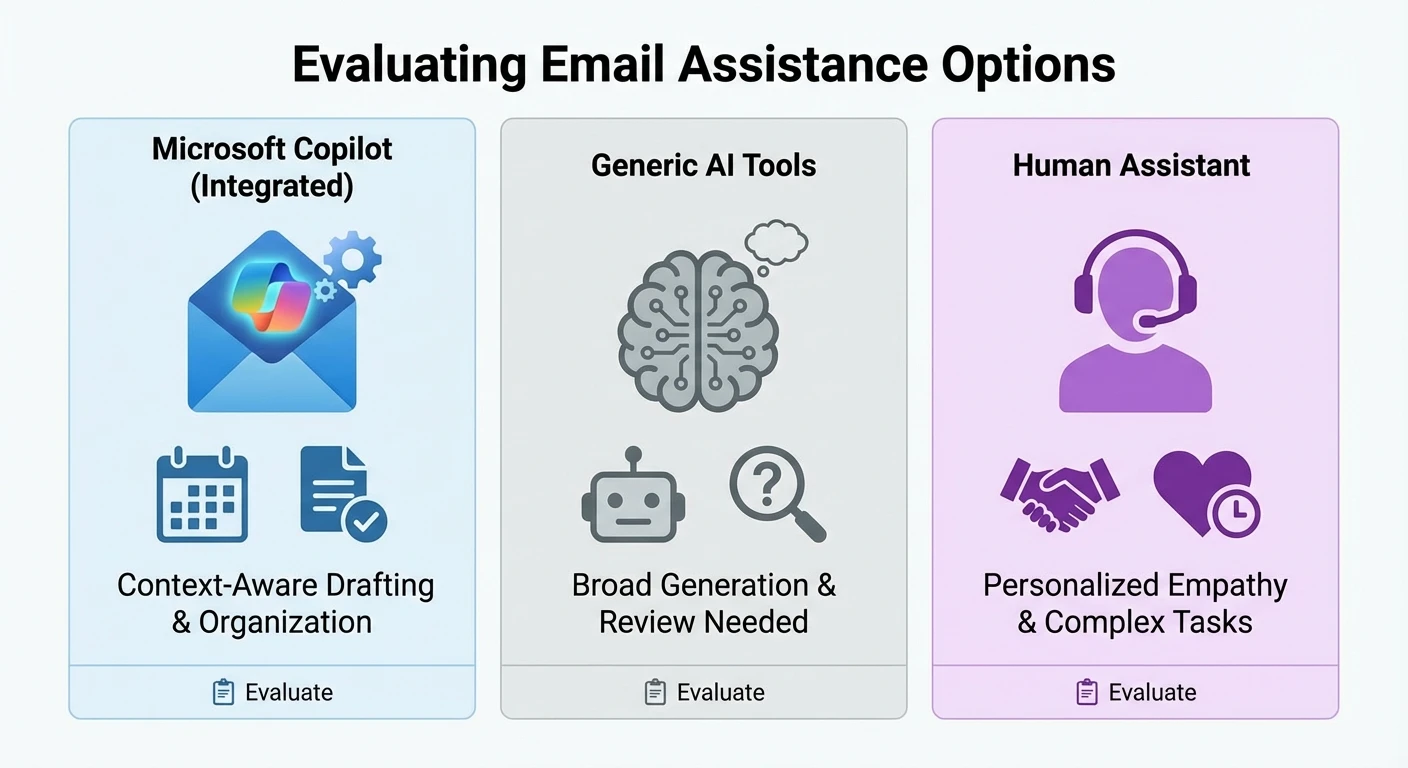
When leaders in Australia look at Copilot for Outlook, they rarely see it in isolation. The obvious question is, “Why not just use the AI built into competing email platforms or a standalone assistant?” There is also the very human benchmark: a real‑world assistant who already knows your style, politics, and relationships.
Compared with generic AI writing tools, Copilot’s unique advantage is native integration. It can see your inbox, calendar, and files inside Microsoft 365 (based on your existing permissions) and take direct actions like pinning, flagging, or archiving messages, while keeping your data within the Microsoft 365 service boundary rather than using it to train Microsoft’s foundation models. That tight connection lets it create meeting invites based on email context, reference internal documents more accurately, and streamline triage in a way that external tools, which lack inbox access, simply cannot match as third‑party walkthroughs of Copilot for Outlook have noted.
However, if you rely heavily on another email ecosystem, the trade‑offs shift. Some alternative platforms offer their own AI‑driven smart replies and summarisation, but they usually operate with a narrower view of your broader work graph and may not reach as deeply into enterprise collaboration tools. Copilot’s strength remains the broader Microsoft 365 context rather than being the most creative writer in a vacuum – and in some cases, organisations contrast that with independent Australian AI assistants that are email‑agnostic.
The human comparison is more nuanced. A skilled executive assistant in Melbourne or Brisbane brings two superpowers Copilot does not yet touch:
- Deep interpersonal understanding – who really matters to your role, what is politically sensitive, when a short note beats a detailed explanation.
- Proactive judgement – noticing patterns, nudging you on critical relationships, and adjusting filing or rules on the fly without explicit prompts.
Copilot, by contrast, is like a very fast back‑office clerk. It handles bulk triage, drafts standard responses at speed, and never gets tired of summarising long chains. But it will not decide to tactfully rephrase an email to a key donor because it knows you just had a tough meeting with them yesterday; it has no real sense of office politics or emotional context beyond text on a screen.
For many Australian leaders, the most effective model will be “AI plus human”, not either‑or. Use Copilot to clear the undergrowth – the routine updates, basic follow‑ups, and thread summaries – and let humans handle delicate negotiations, high‑stakes stakeholders, and the subtle relationship‑building that defines leadership in any sector, while specialist partners help you navigate which large‑language models sit behind those assistants.
Pragmatic Adoption Strategy and Internal Pilots for AU Organisations
Rolling out Copilot for Outlook email across an Australian organisation is not just a licence tick‑box. It is a change in how people read, think about, and respond to email – and that needs structure. A rushed, “turn it on for everyone” approach may give you an impressive announcement but patchy real‑world impact.
A more grounded pattern starts with a focused internal pilot. Choose a handful of teams where email volume is high and work is largely knowledge‑based – for example, project management offices, internal legal teams, or customer‑facing operations. Make sure they already use the new Outlook for Windows or Outlook on the web heavily; that’s where Copilot’s email experience is currently most complete compared with other clients, and where complementary implementation services can be tested most effectively.
Within that pilot, define what you want to learn. You might look at how long staff spend in email before and after enabling Copilot, whether important messages are handled faster, or how staff perceptions of focus and cognitive load change. Ask them to deliberately use features such as thread summarisation, action‑item extraction, and “Prioritise my inbox” for several weeks, rather than just experimenting once and moving on.
At the same time, bake in basic guardrails. Set clear user expectations: Copilot suggestions must be reviewed, sensitive situations still need human‑crafted communication, and any surprising behaviour (for example, an odd summary) should be reported. These early patterns will shape norms when you expand to a wider audience, so it is worth getting them right.
Once you understand the patterns – who benefits most, where it falls short, what training gaps exist – you can expand in waves. Some roles may not justify the extra licence cost at all; others will become clear candidates. Over time, Copilot should feel less like a novelty and more like an expected part of the Outlook experience for specific job families where email is a dominant channel, ideally woven into a broader roadmap that also considers model‑selection and routing strategies across your AI portfolio.
Practical Tips to Maximise Impact and Minimise Risk

For Australian decision‑makers who do choose to move ahead with Copilot for Outlook email, a few practical moves can significantly improve outcomes. These are less about deep technical setup and more about everyday behaviour and expectations.
- Frame Copilot as “assist, not replace”. Stress that staff remain responsible for what leaves their mailbox. Copilot is there to accelerate reading and drafting, not to become the author of record.
- Encourage short, clear prompts. When people ask for a draft or summary, the results are much better if they specify audience, purpose, and tone. “Reply as a friendly but firm account manager confirming terms” beats “Write a reply”.
- Use it heavily where volume is high. Teams dealing with large numbers of similar emails (tenders, supplier quotes, student queries) will see the fastest benefits from rapid triage and standardised replies.
- Watch for over‑trust. Ask managers to spot‑check Copilot‑assisted emails early on, especially in sensitive conversations. Highlight good examples and quietly coach through poor ones.
- Feed lessons back into training. As you spot where Copilot helps or hinders, update your internal guidelines. Over a few months, this can evolve into a lightweight playbook that reflects your sector, culture, and risk appetite.
Taken together, these habits shift Copilot from being an experiment that a few keen users play with into a deliberate capability that supports how email actually gets done in your organisation, especially when those habits are reinforced by your broader AI knowledge base and playbooks.
Conclusion & Next Steps
Copilot for email in Outlook sits at an interesting junction for Australian organisations. It is not science fiction, and it is not magic. It is a practical, fast‑moving tool that can ease the daily grind of email for the right people, while still depending on human judgement, culture, and controls.
If you are an Australian decision‑maker weighing your next move, treat Copilot as a strategic experiment rather than a blanket answer. Start with a focused pilot, measure real outcomes, and let that data shape where you invest further. And if you want help designing that journey – from use‑case selection through to internal guidelines – LYFE AI can work with your team to cut through the noise and build something that fits your reality, drawing on experience with different OpenAI models and clear engagement terms for Australian clients.
This article is Part 1 of our three‑part “Mastering Copilot for Email in Outlook (with an AU Lens)” series; keep an eye out for the next instalments as you shape your roadmap, and explore how automation across your life and business can complement whatever you decide about Copilot.
Frequently Asked Questions
What is Microsoft Copilot for Outlook email and how does it actually work?
Microsoft Copilot for Outlook is an AI assistant embedded in Outlook that helps you draft, reply to, summarise, and refine emails using natural language prompts. It draws on your own email content, calendars and documents (subject to permissions) to generate context‑aware suggestions, which you can edit before sending. It doesn’t send emails automatically by default – you stay in control of what goes out. It also won’t fix broken processes or poor communication culture on its own; it’s a productivity tool, not a full replacement for human judgement.
Is Copilot for Outlook worth it for Australian businesses and individuals?
For Australian users who live in Outlook all day, Copilot can be worth it if email volume and context‑switching are major pain points. It tends to deliver the strongest ROI for knowledge workers, sales, service and leadership roles that handle large, repetitive or sensitive email workloads. However, its value depends on licence cost, how much time it realistically saves, and whether your team actually adopts it. Many organisations in Australia start with a small pilot to measure time saved per user before rolling it out more widely.
How does Microsoft Copilot handle email privacy and data residency for Australian organisations?
Copilot honours your existing Microsoft 365 security, permissions and compliance settings, meaning it won’t show users data they aren’t already allowed to access. For Australian organisations using appropriate Microsoft 365 regions, core data is hosted within Microsoft’s regional data centres, but you should confirm the exact data residency and processing locations with your tenant settings and Microsoft documentation. Copilot prompts and outputs can be logged like other Microsoft 365 activities, which has implications for audit and discovery. You’ll usually want to update internal policies, consent notices and training so staff understand what’s being processed and how.
What are the key risks of using Copilot for email in Outlook in an Australian context?
Main risks include over‑trusting AI‑generated emails, accidentally disclosing sensitive information, and creating compliance or record‑keeping gaps if staff don’t follow existing rules. In Australia, sectors like health, finance, government and legal also need to consider APPs (Australian Privacy Principles), sector‑specific regulations and client confidentiality. There’s also reputational risk if poorly reviewed AI emails go to customers or regulators. Mitigation usually involves clear policies, human review of outputs, role‑based access, and targeted training rather than blanket restrictions.
How does Copilot for Outlook compare to other AI email tools and plugins?
Copilot is deeply integrated into Outlook and the Microsoft 365 stack, so it can use your emails, calendar and documents with existing identity and security controls. Third‑party AI email tools often work via browser extensions or separate apps, which can be more flexible or cheaper but may raise extra security, data‑sharing and compliance questions, especially in regulated Australian industries. Copilot is optimised for Microsoft’s ecosystem, while some alternatives specialise in specific workflows like sales outreach or CRM integration. A common strategy is to pair Copilot with a secure, local AI assistant (such as LYFE AI) for broader, non‑email tasks where data sovereignty and custom controls matter more.
Can Copilot replace a human executive assistant or admin for managing Outlook email?
Copilot can draft and refine emails quickly, summarise long threads and suggest responses, which reduces the time an EA or manager spends on routine correspondence. However, it can’t reliably handle nuanced judgement, office politics, prioritisation across channels, or confidential matters the way a skilled human assistant can. Most Australian executives see the best results when Copilot supports both them and their EA, not when it replaces the role. Think of it as a writing accelerator and triage helper, not a full EA substitute.
How should an Australian organisation run an internal pilot for Copilot in Outlook?
Start with a small, mixed group of users who handle high email volumes across different functions (e.g. sales, operations, leadership) and define clear success metrics like time saved, response quality and error rates. Limit the pilot to specific scenarios (customer responses, internal updates, meeting follow‑ups) and provide short, practical training on prompts and safe‑use guidelines. Track usage, collect structured feedback and review any incidents or compliance concerns. Use these findings to refine policy, training and licence scope before a broader rollout.
What are some best practices to get good results from Copilot for Outlook email?
Be specific in your prompts (e.g. ‘Draft a brief, friendly reply confirming Friday 3pm AEST and asking for agenda items’) and always edit the draft to match your tone and context. Use Copilot for summarising long threads, generating first drafts, rewriting for clarity or tone, and creating variations, rather than for final copy. Avoid pasting highly sensitive or client‑identifying information into prompts unless your organisation has explicitly allowed it and configured protections. Many Australian teams also create prompt libraries and examples so staff can learn quickly and stay consistent.
Why would an Australian business use a local AI assistant like LYFE AI alongside Microsoft Copilot?
Copilot is strongest inside the Microsoft 365 environment, especially for Outlook email, documents and meetings, but it’s not designed to be a fully custom, Australian‑hosted assistant for every task. A local AI assistant like LYFE AI can be configured with stricter data residency, bespoke knowledge bases, governance controls and integrations tailored to Australian laws and business processes. This lets you keep sensitive or non‑Microsoft workflows inside a more controlled local environment while still leveraging Copilot where it excels. Many organisations adopt a ‘best‑of‑both’ model: Copilot for Outlook and Office, LYFE AI for broader secure automation and advisory tasks.
How can I measure ROI from Copilot for Outlook in an Australian organisation?
Track baseline metrics such as average email response time, number of emails sent per day, and time spent in Outlook before enabling Copilot. During a pilot, measure changes in these metrics, plus qualitative feedback on stress levels, focus time, and perceived email quality. You can then compare the productivity gains or time saved against licence and change‑management costs. For boards and executives, framing ROI in terms of reclaimed hours for higher‑value work and reduced burnout can be as important as raw cost savings.