
Table of Contents
- Introduction – Gemini 3.1 Pro vs GPT vs Claude in plain English
- What is Gemini 3.1 Pro and why it matters for modern AI stacks
- Multimodality and long context – Gemini 3.1 Pro vs GPT vs Claude
- Reasoning control, safety, and alignment across Gemini, GPT, and Claude
- APIs, integrations, and business workflows in Australia
- Can Gemini 3.1 Pro replace GPT or Claude as your main AI assistant?
- Practical tips for choosing the right AI model for your use case
- Conclusion and next steps for working with Gemini 3.1 Pro
Introduction – Gemini 3.1 Pro vs GPT vs Claude in plain English
Gemini 3.1 Pro, OpenAI GPT, and Claude now sit at the top of the AI food chain. If you are building products, automations, or internal tools, choosing between them is not a tiny choice. It shapes speed, costs, and even what is possible.
This guide breaks down Gemini 3.1 Pro compared to leading GPT models and the latest Claude models, with a clear focus on how this all lands in Australia. The emphasis is on multimodality, long context, reasoning control, integrations, and real business use cases so you can decide what actually fits your stack – not just what sounds shiny.
You will walk away with a simple, practical framework you can use to test these models on your own workloads before you commit budget or roadmap space, and, if you want a managed path, how a secure Australian AI assistant for everyday tasks can sit on top of whichever model you choose.
What is Gemini 3.1 Pro and why it matters for modern AI stacks
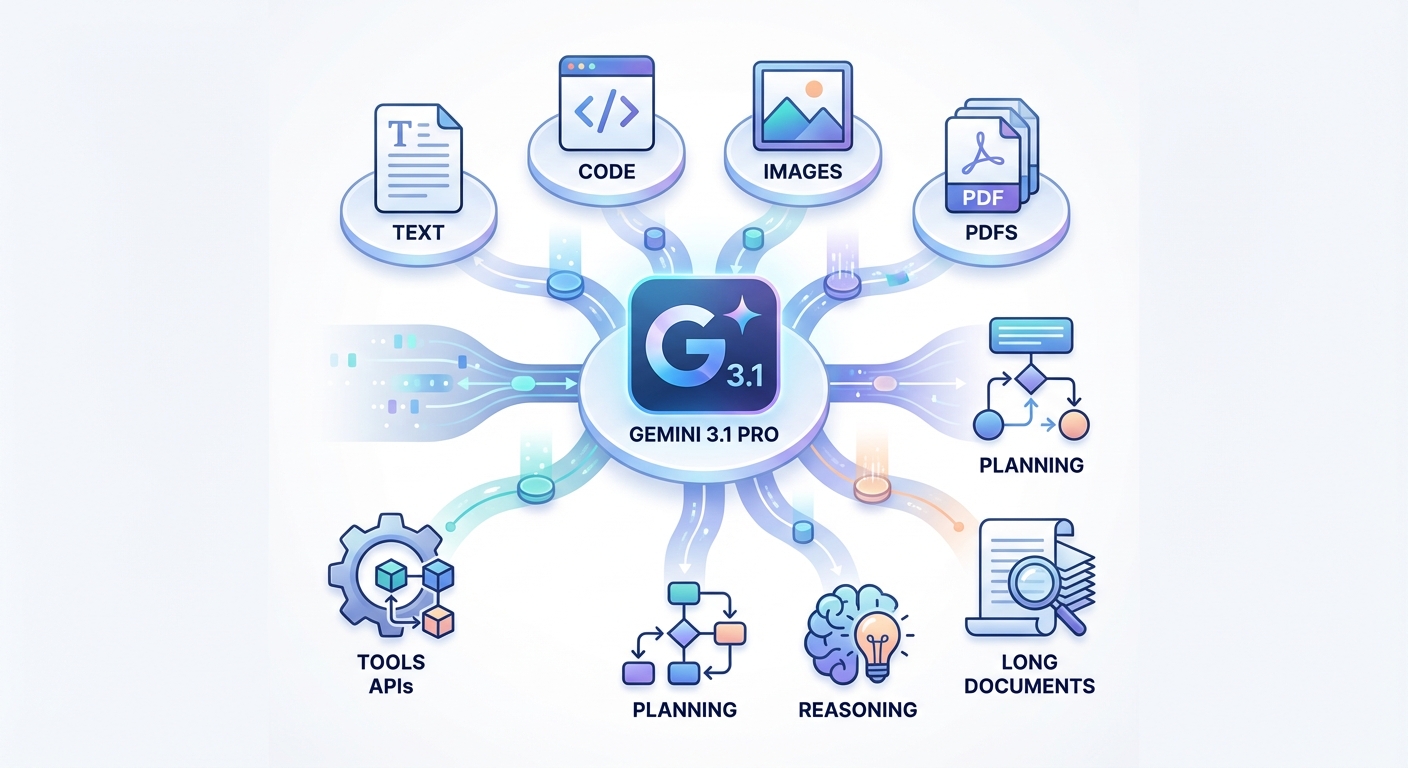
Gemini 3.1 Pro is Google’s most advanced general-purpose AI model, built as a natively multimodal system. according to Google’s own launch overview. It can take in text, code, and images in one go, with support for handling longer documents like PDFs, without you having to hack together extra pipelines. In practice, this lets you upload a 600-page research bundle with charts, code snippets, and scanned images, then ask one model to review, compare, and summarise everything in context.
One of the most important design ideas behind Gemini 3.1 Pro is its agentic orientation. It is built not just to chat, but to plan and act. Out of the box, it supports tool calling, including multimodal function calling. You can send it a high-level goal, let it call APIs, work with your internal tools, and return structured outputs that plug straight into your workflows – especially when you are pairing it with done-for-you AI automation services instead of wiring everything yourself.
Another distinctive feature is what Google calls “thought signatures,” encrypted representations of the model’s internal reasoning state that preserve its chain of thought across multi-turn and multi-step interactions. Imagine a long-running finance agent that handles your monthly reporting. Instead of losing the thread after a few calls, Gemini 3.1 Pro keeps an internal memory of the reasoning steps it has already taken so that it can plan further moves without repeating itself or drifting.
Finally, Gemini 3.1 Pro is tuned for turning high-level requirements into working code or workflow steps. You might say, “Build me a simple internal tool to triage support tickets, log them in Sheets, and send alerts in Slack.” Instead of giving you one big generic script, the model can break the job down, generate structured pieces, and orchestrate them across tools – exactly the kind of pattern you see in custom AI workflow and automation builds.
For a deeper technical view, Google’s own Gemini 3.1 Pro model card and reference documentation outline how this general-purpose model is positioned for complex reasoning and enterprise workloads.
Multimodality and long context – Gemini 3.1 Pro vs GPT vs Claude
When you compare Gemini 3.1 Pro with GPT-4.1 and leading Claude 3.x models, one of the clearest differences is context window size. Gemini 3.1 Pro offers a context window of up to roughly one million tokens per Google DeepMind’s model overview. per Google DeepMind’s model overview. That is big enough to take in around 1,000 pages in a single pass. GPT-4.1 offers a context window of up to around one million tokens, GPT-4.1 Turbo stays in the hundreds of thousands of tokens, and Claude 3.x models generally provide a 200,000-token window, with million-token contexts available only for select enterprise use cases.
If your use case involves very large corpora – full code repositories, large legal bundles, policy libraries, or long-form research – context size can be the tie-breaker. With Gemini 3.1 Pro or Claude 3.x, you can often drop the entire dataset into one conversation and ask for cross-document reasoning. GPT models are still strong here, but you may need to chunk or index more aggressively (which is exactly the sort of nuance a specialist professional AI implementation team can handle for you).
All three families are competitive in multimodality. GPT-4.1 can handle images and text, and newer variants extend into audio and video. Claude offers strong vision and long-context reading. Where Gemini 3.1 Pro stands out is that multimodality is “native” to the model. It can reason over code, images, audio, and video together, then use tool calling in the same flow. For example, you might upload a training video, ask the model to extract steps, check those steps against a PDF safety manual, and then push structured tasks into a project management tool.
From a use case perspective, this means you can push Gemini 3.1 Pro hard on mixed-media business workflows. Think: review a video from a site inspection, match it to the plan in a PDF, pull out risks, then generate tasks in your ticketing system. GPT and Claude can do similar things with the right setup, but Gemini’s integrated multimodal and tool-calling design can make the build smoother, particularly when paired with careful model selection between GPT‑5.2 and Gemini 3 for each workflow.
At LYFE AI, we usually suggest Gemini 3.1 Pro as the primary option when you know your workload will involve huge, messy inputs – full repos, big research packs, multi-format documentation – and you want a single model to read, reason, and act across the whole pile, rather than juggling multiple assistants or re-indexing the same data.
You can also see how Gemini is positioned as an everyday assistant in Google’s own materials at Gemini’s product overview, which highlights how those multimodal strengths surface in day-to-day workflows.
Reasoning control, safety, and alignment across Gemini, GPT, and Claude
Reasoning is where many teams feel the difference between these models, especially when they start wiring them into serious decision flows. Gemini 3.1 Pro has an interesting twist here: it supports adaptive reasoning through a setting called `thinking_level` inside one model. Instead of swapping models to go from “fast and shallow” to “slower but deeper”, you can programmatically dial how hard the model should think on each request – a capability that Google highlights as part of its “step forward in core reasoning” narrative for the Gemini family as reported by industry press.
GPT, in contrast, usually separates standard models from dedicated “reasoning” models, like the o-series. That gives you strong specialist performance but often means you need routing logic: lighter traffic goes to one endpoint, heavy reasoning goes to another. It works, but you are now maintaining more infrastructure and prompt patterns. If you want a single-model setup with fine-grained control, Gemini’s design can reduce that overhead.
Claude models sit in a similar reasoning band to Gemini and GPT, at least from public benchmarks and field tests. Where Claude stands apart is its strong focus on constitutional safety and conservative alignment. Anthropic trains Claude to follow a built-in “constitution” of rules, which tends to yield careful, steady answers, even when pushed by weird or risky prompts. In regulated industries in Australia, some teams prefer that extra conservatism, even if it feels slightly slower to respond or more cautious in suggestions.
Gemini, for its part, pairs its reasoning upgrades with Google’s responsibility frameworks. That includes filters, safety layers, and content policies that control how the model responds in sensitive areas. For most business cases, these guardrails are a positive: they reduce the risk of inappropriate or harmful outputs making their way into a customer-facing flow (and they matter even more once you begin deploying agentic automations that act inside your production systems).
The best approach is usually pragmatic. If you need very fine control over per-call reasoning depth without swapping models, Gemini 3.1 Pro has a clear edge. If you care most about cautious behaviour and constitutional safety, Claude is worth close attention. If you want the richest ecosystem, plugin-like tools, and broad-model variety, GPT remains extremely compelling – and you can compare its “reasoning” tiers directly with Gemini 3 in guides like GPT‑5.2 vs Gemini 3 model comparisons.
For teams that want a curated, low-friction starting point, a secure Australian AI assistant layered over these models can give you governance and safety defaults without sacrificing flexibility.
APIs, integrations, and business workflows in Australia
API access and integration paths often matter more than raw model power. You might have the “smartest” model on paper, but if it is painful to wire into your stack, you will not ship. Gemini 3.1 Pro is accessible through Google’s own APIs, third-party gateways like OpenRouter’s Gemini 3.1 Pro preview endpoint for some testing access, and through Workspace extensions that hook straight into Gmail, Calendar, and more.
From a practical build perspective, you can deploy Gemini 3.1 Pro in three main ways. First, direct API orchestration, where your backend calls Gemini in the cloud and then routes outputs into your app or data pipeline. Second, embedding it behind your existing applications, for example as a “brain” inside your helpdesk, CRM, or internal portal. Third, using no-code or low-code tools in the Gemini app or Google’s AppSheet to create smaller internal tools without a full engineering team – often with a professional implementation partner helping your internal team move faster.
The architecture places Gemini 3.1 Pro in the cloud, with no real push toward on-device inference at this stage. For Australian teams, this fits normal cloud adoption patterns – especially if you are already on Google Cloud. Regional integration details are not unique to Australia; standard Google Cloud practices apply, though certain advanced features may roll out in the US first.
For enterprises, the biggest impact comes through Google Workspace and AI subscription plans. With the right Google Workspace or Google AI subscription, Gemini 3.1 Pro can help you draft emails in Gmail, write and edit documents in Docs, summarise meetings in Meet, and even create videos via Vids. Organisations can build custom companions and chatbots that interact with Sheets for finance models, or with AppSheet for bespoke mini-apps.
Access is tiered through Plus, Pro, and Ultra style plans, which control usage limits and unlock features like Deep Research and advanced agent capabilities. In Australia, core Gemini 3 features are generally live for Workspace users, but some of the flashier modes remain limited by country and language. It is worth checking your Workspace admin console and the public eligibility lists before planning a big rollout – or having a look at how Google’s Gemini subscription tiers are structured before you select a plan.
If you would rather outsource integration, end-to-end AI services that cover discovery, design, build, and monitoring can dramatically shorten the path from “interesting API” to “stable workflow running in production”.
Can Gemini 3.1 Pro replace GPT or Claude as your main AI assistant?
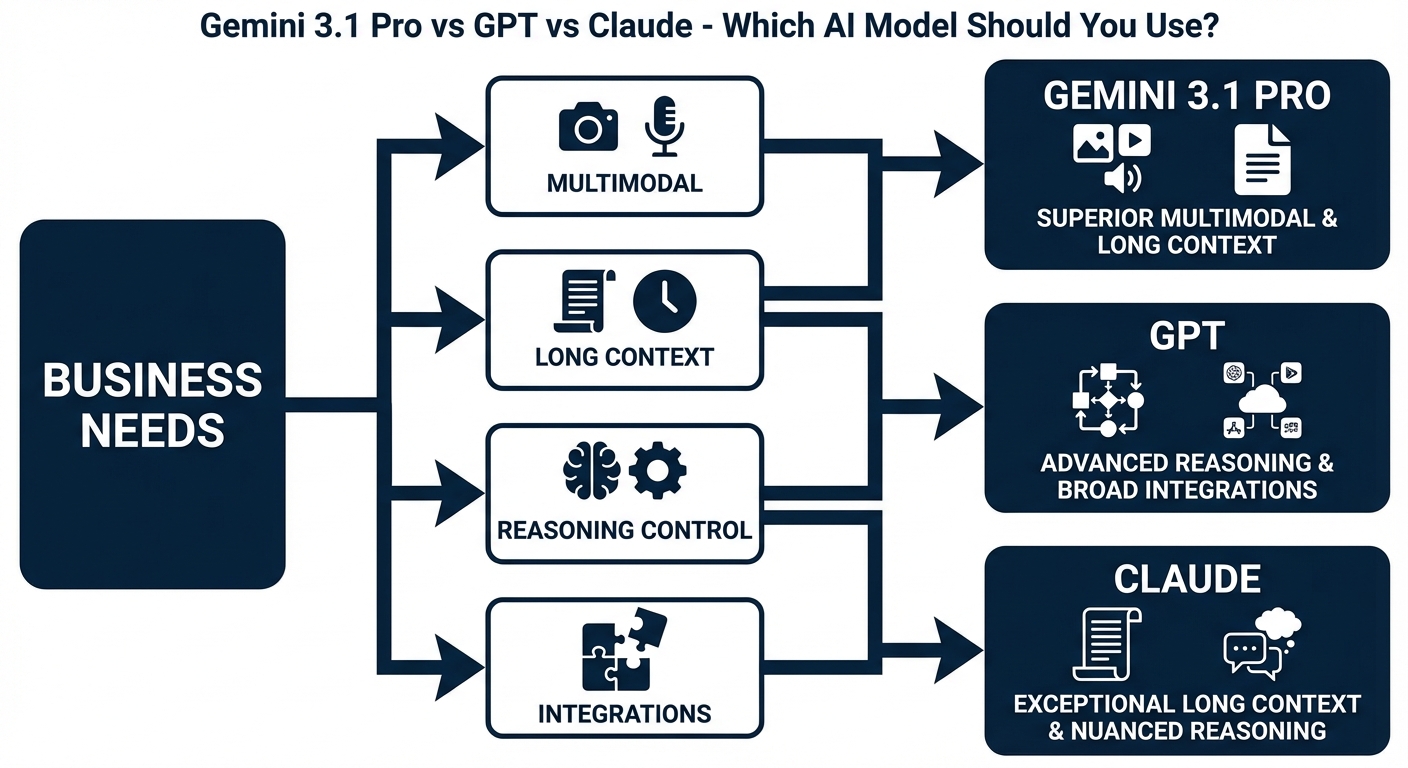
A natural question: should you replace your current GPT or Claude-based assistant with Gemini 3.1 Pro? The honest answer is “it depends on your ecosystem”. If you live and breathe Google Workspace – Gmail, Docs, Sheets, Calendar, Meet – Gemini 3.1 Pro is a very strong candidate to become your default AI layer, especially once you wrap it in a secure AI assistant built for Australian privacy expectations.
Gemini 3.1 Pro plugs deeply into Google’s apps. It can draft emails based on threads, generate docs, summarise meetings, and even help with scheduling and follow-ups through Calendar. Features like Deep Research let it run longer, more structured investigations on the web, then return organised results. You also get creative options like video generation (through tools like Veo 3.1) and high-quality images using linked image models.
As a general-purpose assistant, Gemini 3.1 Pro can handle planning, writing, code, research, and multimodal tasks in one place. However, for some creative writing and open-ended ideation tasks, OpenAI GPT models are still widely seen as leaders. They tend to feel a bit more “imaginative” in stories or fiction, which is why many content-heavy teams still keep GPT in the mix – and why detailed comparisons like OpenAI o4‑mini vs o3‑mini and GPT‑5.2 Instant vs GPT‑5.2 Thinking can be helpful when you are squeezing performance and cost.
Claude, on the other hand, is often chosen by teams who prioritise safety and steady judgement. If you are working in law, healthcare, or other sensitive fields in Australia, you may value Claude’s conservative stance on tricky questions. It can also be a great long-context reader for policy, standards, and procedure documents.
For most modern teams, the smartest strategy is hybrid. Use Gemini 3.1 Pro where its strengths shine – Google ecosystem tasks, agentic workflows, multimodal reasoning, large-context analysis. Keep GPT or Claude as specialised tools when you want peak creativity, a separate safety profile, or redundancy. Testing all three on your real workloads is the only solid way to see which feels like your “primary” assistant, and you can always revisit your mix as model pricing and feature sets evolve.
If you want a sense-check before committing, it is worth reviewing your provider’s terms and conditions and privacy posture so you know exactly how data, prompts, and logs are handled.
Practical tips for choosing the right AI model for your use case
With so much noise around AI models, it helps to use a simple, grounded process when you decide between Gemini 3.1 Pro, GPT, and Claude. Here is a practical way to approach it, especially if you are building from Australia.
First, define your main workload types. Are you mostly dealing with long documents, legal or policy libraries, or whole codebases? If yes, put Gemini 3.1 Pro and Claude 3.x at the front of the queue for their million-token context windows. If your work is more about fast chat, short documents, and creative copy, keep GPT in the mix as a core option.
Second, map your ecosystem. If your business already runs on Google Workspace, testing Gemini 3.1 Pro inside Gmail, Docs, and Meet is a no-brainer. If your world is more Microsoft, custom stacks, or heavy OpenAI usage, you may keep GPT as a default and add Gemini where needed for multimodal and high-context jobs (or let a specialist Australian AI consultancy run those experiments with you).
Third, run head-to-head tests on your own data. Give each model the same tasks: a policy pack to summarise, a complex customer email to draft, a code review, a multimodal analysis. Score them on accuracy, speed, clarity, and how easily you can call them via API. For Gemini 3.1 Pro, try toggling `thinking_level` to see how deeper reasoning changes results and latency – and consider whether you want to standardise on one provider, or mix models the way you might mix cloud regions.
Finally, do not forget practical factors like pricing, rate limits, and regional feature availability. Check which advanced options are actually live in Australia today, not just mentioned in global launch keynotes. That small detail has tripped up more than one team trying to roll out an AI assistant across an AU office, which is why keeping an eye on up-to-date guides – such as walkthroughs covering access to Gemini 3.1 Pro or Google’s current Gemini subscription tiers – can save you from nasty surprises.
If you prefer not to track every release note yourself, you can lean on managed AI services that monitor model changes, pricing shifts, and capability upgrades for you, and even expose them through a single secure assistant instead of dozens of direct API calls.
Conclusion and next steps for working with Gemini 3.1 Pro
Gemini 3.1 Pro, GPT, and Claude are all powerful, but they shine in slightly different spaces. Gemini 3.1 Pro brings native multimodality, huge context, and agent-focused design that fits both Google-first teams and builders who need serious workflow automation. GPT still offers a rich ecosystem and top-tier creativity, while Claude delivers cautious, long-context reasoning with strong alignment.
The safest move is to test, not guess. Spin up small pilots with your real data and workflows, compare outcomes, and then lock in a stack that gives you the right blend of reasoning depth, safety, and integrations for your Australian operations. Start with one high-impact process – maybe document review or internal support – and let the results guide your next AI investments; and if you want a structured way to do that, you can start from a secure Australian AI assistant and layer in bespoke automations as you go.
For ongoing learning and benchmarking, it is worth bookmarking high-level resources like Google’s Gemini model overview and your provider’s own AI best-practice articles and case studies so you can adjust your model mix as capabilities shift.
Frequently Asked Questions
What is Gemini 3.1 Pro and how is it different from GPT and Claude?
Gemini 3.1 Pro is Google’s latest general-purpose AI model that is natively multimodal, meaning it can handle text, code, and images in a single request. Compared with OpenAI’s GPT and Anthropic’s Claude, Gemini 3.1 Pro is positioned as an “agentic” model that’s designed to plan, call tools and APIs, and integrate into workflows. GPT models generally lead on ecosystem maturity and third‑party plugins, while Claude is known for long context windows, careful reasoning, and safety. The right choice depends on whether you prioritise multimodality, ecosystem, or long-context reasoning for your use case.
Which is better for business use, Gemini 3.1 Pro, GPT, or Claude?
None is universally “best”; the right model depends on your workloads and constraints. Gemini 3.1 Pro is strong for multimodal tasks and Google Cloud–centric stacks, GPT is often best when you need broad integrations and cutting-edge capabilities quickly, and Claude excels at long documents, analysis, and safer reasoning. Many businesses end up using a combination: for example, GPT for coding and chat, Claude for research and summarisation, and Gemini for document + image workflows. LYFE AI can help you test each against your real business tasks and route requests to the model that performs best.
How do I choose between Gemini 3.1 Pro, GPT, and Claude for my specific use case?
Start by defining your top 3–5 use cases (e.g. customer support, document review, internal tools) and what matters most: cost, accuracy, speed, compliance, or multimodality. Then run a small evaluation: give each model the same real-world prompts and documents your team uses and compare outputs on quality, latency, and cost. For production systems, also check how easily each model integrates with your stack (APIs, SDKs, security, Australian data residency). LYFE AI offers done-for-you evaluations and can implement a routing layer so the “best model per task” is chosen automatically.
Is Gemini 3.1 Pro actually better for multimodal AI than GPT or Claude?
Gemini 3.1 Pro is designed from the ground up as a multimodal model, so it handles mixed text, code, and images in one coherent context and can pull insights across formats. This makes it particularly strong for workflows like reviewing PDFs with charts, screenshots, and code snippets in one go. GPT and Claude both support images, but their strengths skew more toward text, reasoning, and coding use cases. For heavy multimodal pipelines, it’s common to use Gemini 3.1 Pro as the primary model and fall back to GPT/Claude where they’re stronger.
Which AI model is best for long documents and large context windows?
Claude models are typically the strongest for reading and reasoning over very long documents because they support extremely large context windows and are tuned for careful analysis. Gemini 3.1 Pro also supports long-context workloads and can handle large PDFs and mixed media, which is helpful if your documents include images or charts. GPT models have strong performance but may require more careful chunking and retrieval techniques for very large corpora. LYFE AI can build retrieval-augmented generation (RAG) pipelines so any of the three models can work reliably with your document stores.
How do costs compare between Gemini 3.1 Pro, OpenAI GPT, and Claude for business use?
Pricing varies by model version and token usage, but in general, all three providers now offer competitive rates for enterprise-scale workloads. GPT often has the most granular pricing tiers and specialised models (e.g. cheaper small models for high-volume tasks), while Gemini and Claude can be more cost-effective for specific workloads like multimodal or long-context. The most reliable way to compare is to run a week-long pilot where you log tokens, latency, and user satisfaction for each model on the same tasks. LYFE AI can help you set up this pilot and optimise prompts and caching to reduce total spend.
Are Gemini, GPT, and Claude safe and compliant for Australian businesses?
All three providers invest heavily in safety systems, content filters, and enterprise compliance, but the details differ by vendor and hosting option. For Australian businesses, you need to consider data residency, where logs are stored, contract terms, and sector requirements (e.g. health, finance, government). Using an intermediary like LYFE AI lets you control where your data is processed, mask or anonymise sensitive information, and standardise governance across whichever model you choose. LYFE AI can also help you implement access controls, logging, and model-level safeguards aligned with Australian regulations and your internal policies.
Can I use multiple AI models together instead of choosing just one?
Yes, many mature teams run a multi-model strategy where different AI models are used for what they do best. For example, you might use GPT for code generation and chatbots, Claude for long-form analysis and policy-heavy workflows, and Gemini 3.1 Pro for multimodal document processing and Google Workspace integration. A routing layer can decide which model to call based on task type, sensitivity, or cost. LYFE AI’s platform and automation services are designed to sit on top of multiple models and abstract this complexity away from your end users.
How can LYFE AI help me implement Gemini 3.1 Pro, GPT, or Claude in my organisation?
LYFE AI offers a secure Australian AI assistant layer plus done-for-you automation services that can sit on top of Gemini, GPT, Claude, or a combination of them. They help you identify high-ROI use cases, run structured model evaluations on your real data, and then design workflows that plug into your existing tools (email, CRMs, Google Workspace, internal systems). LYFE AI also manages prompt engineering, routing between models, monitoring, and ongoing optimisation so you don’t need in-house AI engineers. This lets you get production-ready AI capabilities quickly while retaining control over data, security, and compliance.
Do I need developers to start using these AI models, or can non-technical teams use them via LYFE AI?
Directly integrating Gemini, GPT, or Claude via API usually requires developer resources and engineering time. With LYFE AI, non-technical teams can access these models through a secure assistant interface and prebuilt workflows tailored to everyday tasks like drafting documents, analysing files, and summarising meetings. For more advanced automations, LYFE AI’s team can handle the technical integration and maintenance. This approach lets you benefit from top-tier models while keeping implementation overhead low.